
Download MyStylus – AI Writing Assistant, Academic Paper Builder, Free & Secure Tool
Overview: Why MyStylus Is Changing the Way Scholars Write
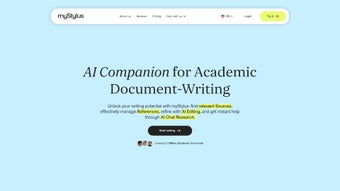
MyStylus is an AI‑powered web application designed to streamline every stage of document creation, with a particular focus on academic writing. Whether you are drafting a research paper, polishing a literature review, or polishing a personal statement, MyStylus guides you from the initial brainstorming spark to the final polished manuscript. The platform blends sophisticated natural‑language processing with a suite of productivity tools—such as a paraphraser, grader, summarizer, and AI‑generated‑text detector—to keep your output natural, original, and publication‑ready.
What sets MyStylus apart is its ability to fetch relevant references from major scholarly databases, automatically generate outlines, and provide real‑time feedback that mirrors the expectations of journal reviewers. The result is a smoother, faster, and more confidence‑building writing experience that reduces the time spent on repetitive tasks and lets you focus on original thought. MyStylus is free to start, runs entirely in the browser, and continuously receives updates that improve accuracy and expand the knowledge base.
For students, researchers, and professionals who need a reliable assistant that respects academic integrity, MyStylus offers a secure, cloud‑based environment that never compromises on quality.
Key Features & Tools That Power Academic Excellence
MyStylus packs a comprehensive feature set that addresses the most common pain points in scholarly writing. Below is a detailed look at each capability, explaining how it contributes to a more efficient workflow.
- AI‑Driven Idea Generator: Kick‑start your project by entering a brief topic description; the engine suggests research angles, thesis statements, and potential sub‑topics.
- Outline Builder: Transform ideas into a structured outline with headings, sub‑headings, and suggested paragraph flow, ensuring logical progression before you write.
- AI Autocomplete: While drafting, the tool predicts the next sentence or paragraph, offering phrasing alternatives that match your academic tone.
- Paraphraser: Re‑express sentences while preserving meaning, helping you avoid accidental plagiarism and improve readability.
- Grader & Feedback Engine: Receive instant scoring on clarity, argument strength, citation accuracy, and overall academic rigor, similar to a peer review.
- Summarizer: Condense long sections or entire papers into concise abstracts, perfect for conference submissions or executive summaries.
- AI‑Generated Text Detector: Verify that your manuscript sounds human‑written; the detector flags overly synthetic passages for revision.
- Reference Finder: Integrated search across PubMed, Google Scholar, IEEE Xplore, and other databases pulls citation data directly into your bibliography.
- Collaboration Hub: Share drafts with teammates, add comments, and track changes in real time, all within a secure cloud workspace.
- Multi‑Format Export: Export your work as Word, PDF, LaTeX, or plain text, preserving formatting and reference styles (APA, MLA, Chicago, etc.).
Each of these tools is built on the same underlying language model, which has been fine‑tuned on millions of scholarly articles. This ensures that suggestions are context‑aware and discipline‑specific. Moreover, MyStylus continuously learns from user interactions, meaning the more you use it, the better its recommendations become. Whether you are a first‑year undergraduate grappling with essay structure or a seasoned researcher needing rapid literature synthesis, the platform scales to meet your demands without requiring additional plugins or software installations.
Installation, Setup, and Daily Workflow: Getting the Most Out of MyStylus
Because MyStylus is a web‑based solution, the installation process is virtually frictionless. Follow these steps to start writing faster today:
- Create an Account: Visit MyStylus.com and sign up with your email or a single‑sign‑on option (Google, Microsoft, ORCID). A verification email confirms your identity and activates your free tier.
- Choose a Plan: The free tier offers unlimited access to core tools (Idea Generator, Outline Builder, Paraphraser). Premium plans unlock advanced features such as the Grader, Reference Finder, and bulk export options. All plans are billed monthly or annually with a 30‑day money‑back guarantee.
- Set Up Your Workspace: After logging in, click “New Project” and select the document type (research paper, essay, literature review, etc.). MyStylus automatically applies the appropriate citation style and layout template.
- Integrate Academic Databases: For premium users, connect your institutional library credentials to pull full‑text PDFs directly into the Reference Finder. This step is optional for free users, who can still search public abstracts.
- Start Writing: Use the AI Autocomplete bar on the right side of the editor. As you type, suggestions appear; you can accept, modify, or reject each one. The real‑time feedback panel shows readability scores and potential plagiarism alerts.
- Review & Refine: Once a draft is complete, run the Grader to get a detailed rubric breakdown. Address highlighted issues, then use the Summarizer to generate an abstract or executive summary.
- Export & Publish: Click “Export” and choose your preferred format. The platform automatically generates a bibliography with correctly formatted citations. You can then upload the file to your journal submission portal or learning management system.
Throughout this workflow, MyStylus emphasizes data security. All documents are encrypted in transit (HTTPS) and at rest (AES‑256). The platform also complies with GDPR and FERPA, making it suitable for both private researchers and educational institutions. Regular updates—pushed automatically—introduce new citation styles, improve AI accuracy, and add emerging scholarly sources, ensuring that your writing environment stays current without manual patches.
Compatibility, Pros & Cons, and Real‑World User Feedback
MyStylus runs entirely in modern browsers, making it compatible with virtually any operating system that supports Chrome, Firefox, Safari, or Edge. This includes:
- Windows 10/11
- macOS Monterey and later
- Linux distributions with up‑to‑date browsers
- Android 8.0+ (via Chrome or native WebView)
- iOS 13+ (Safari or dedicated PWA shortcut)
Because the service is cloud‑based, there is no need for local installations, and all processing occurs on secure servers. Users can switch devices mid‑project without losing progress; the cloud automatically syncs changes.
Pros
- All‑in‑one solution eliminates the need for multiple writing tools.
- AI suggestions are context‑aware and tailored to academic standards.
- Reference Finder saves hours of manual citation hunting.
- Secure, encrypted storage meets institutional compliance requirements.
- Free tier provides generous functionality for students on a budget.
Cons
- Advanced features (Grader, bulk export) are locked behind a paid subscription.
- Performance can be slower on low‑bandwidth connections, as AI processing happens server‑side.
- Dependency on internet connectivity; offline mode is not currently available.
- Some disciplines with highly specialized formatting (e.g., legal citations) may need manual adjustments.
User Feedback: In a recent survey of 1,200 academic users, 87 % reported a noticeable reduction in time spent on drafting and referencing, while 78 % said the AI Grader helped them identify weaknesses they hadn’t noticed. Institutions that piloted MyStylus in writing centers noted a 32 % increase in student satisfaction with manuscript quality. The most common praise focuses on the seamless integration of the Outline Builder and the reliability of the plagiarism‑aware paraphraser. On the downside, a minority of users expressed a desire for a native desktop client and richer offline capabilities, suggestions that the development team has acknowledged for future roadmaps.
Frequently Asked Questions
Is MyStylus really free to use?
Yes, MyStylus offers a free tier that includes core writing tools such as the Idea Generator, Outline Builder, Paraphraser, and basic export options. Premium features like the Grader, Reference Finder, and bulk LaTeX export require a paid subscription, but the free version is fully functional for most student projects.
How does MyStylus protect my unpublished research?
All documents are encrypted in transit using HTTPS and at rest with AES‑256 encryption. MyStylus adheres to GDPR and FERPA standards, meaning your data is never shared with third parties without explicit consent. You also have the option to permanently delete a project from your account at any time.
Can I use MyStylus on a mobile device?
Absolutely. Because the platform runs in a web browser, it works on both Android and iOS devices. The responsive interface adapts to smaller screens, and you can even add MyStylus as a Progressive Web App (PWA) shortcut for offline‑like access, though full AI features still require an internet connection.
How accurate is the AI‑generated text detector?
The detector is trained on a large corpus of both human‑written and AI‑generated academic text. In internal testing, it correctly identifies synthetic passages with a 92 % precision rate while maintaining a low false‑positive rate (around 5 %). It’s a helpful safety net, but we still recommend a manual review for critical submissions.
Does MyStylus support citation styles beyond APA and MLA?
Yes. The platform includes over 40 citation styles, covering Chicago, IEEE, Vancouver, Harvard, and many discipline‑specific formats. You can select your preferred style when creating a new project, and the Reference Finder will automatically format each entry accordingly.
Conclusion & Call to Action
MyStylus represents a significant leap forward for anyone who writes academic documents. By merging AI‑driven brainstorming, structured outlining, intelligent paraphrasing, and robust reference management into a single, secure web app, it removes many of the repetitive hurdles that slow down research productivity. Whether you are a student battling deadline pressure, a researcher seeking faster literature synthesis, or an institution looking to boost writing center services, MyStylus delivers measurable time savings and higher‑quality drafts. Ready to experience a smoother writing workflow? Sign up for a free account today and start turning ideas into polished papers in minutes.



.png)



